Facebook Ads vs Google Ads: Which Is Right for Your Business?
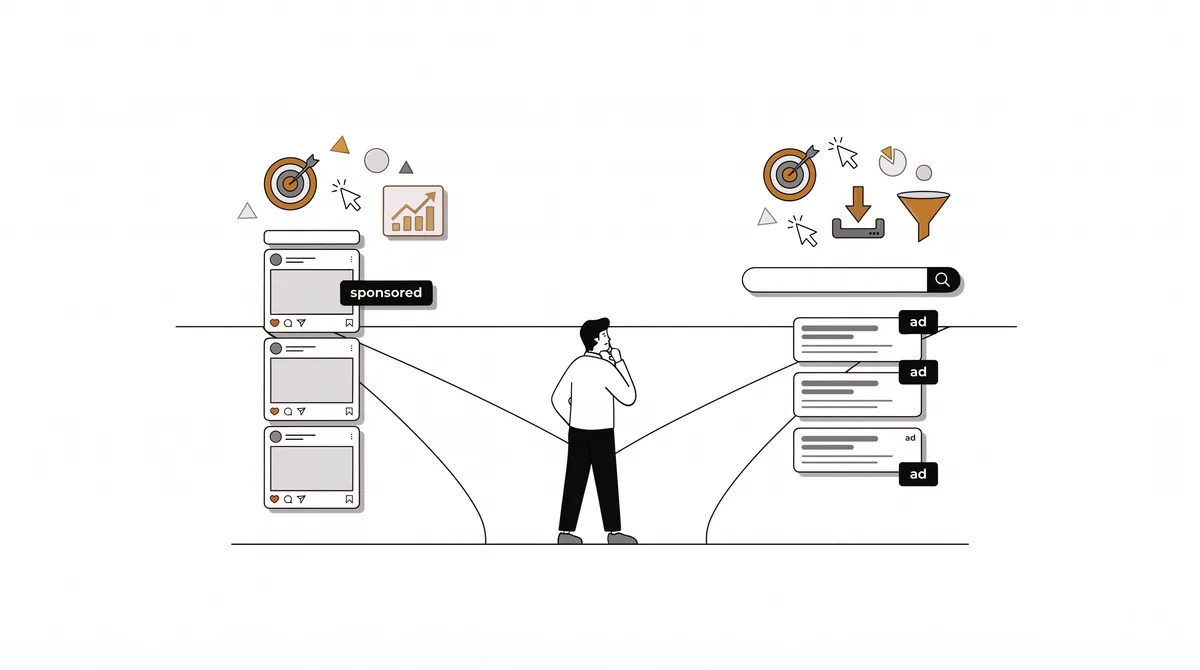
Facebook (and Instagram) ads and Google ads are the two biggest paid channels, and new businesses often waste their first budget by choosing wrong. The difference comes down to intent.
The core difference: demand capture vs demand creation
Google ads capture existing demand. Someone types "emergency plumber near me" and you appear. They already want what you sell; you are just competing to be chosen. That high intent means Google clicks cost more but often convert better.
Facebook and Instagram ads create demand. Nobody opens Instagram looking to buy your product, but a great video can stop the scroll and create the want. Clicks are cheaper, intent is lower, and creative quality matters enormously.
When Google ads win
- ·People actively search for your service (plumbers, dentists, lawyers, repair, "buy X")
- ·You solve an urgent problem where the customer is ready now
- ·Your product is hard to explain visually but easy to search for
When Facebook and Instagram ads win
- ·Your product is visual or impulse-driven (fashion, food, beauty, home goods)
- ·You are creating awareness for something people do not yet search for
- ·You have strong photo or video content, especially authentic user-style content
A simple rule: if customers search for what you sell, start with Google. If you have to show them to sell them, start with Meta.
You do not have to pick forever
Most businesses eventually use both, Google to capture the ready-to-buy, Meta to fill the top of the funnel and retarget. But with a limited first budget, pick the one that matches your buyer intent, prove it works, then expand.
What the numbers look like side by side
The two platforms are priced differently because they sell different things. Google sells a click from someone who is already searching. Meta sells a view, or a click, from someone who is scrolling. Using published benchmarks, here is how that shows up:
| Google Ads, by industry | Cost per click | Conversion rate | Cost per lead |
|---|---|---|---|
| Restaurants and food | $2.05 | 8.05% | $30.57 |
| Beauty and personal care | $4.62 | 10.35% | $39.25 |
| Home and home improvement | $8.33 | 8.05% | $90.92 |
| Attorneys and legal services | $9.87 | 5.55% | $131.63 |
On the Meta side, Lebesgue's March 2026 benchmarks put the all-industry average at about $14.19 per thousand impressions and about $38.19 per customer acquired. Those are blended figures across industries and objectives, so use them as a rough guide only. What they show is that Meta usually costs less per person reached, while Google costs more per click but reaches people closer to buying.
Do not compare the platforms on cost per click alone. A cheap click from someone who was not looking for you can cost more per customer than an expensive click from someone who was.
How to decide with your first budget
- 1.Ask what happens when your customer needs you. If they open Google and search, start with Google. If they would never search for you because they do not know you exist, start with Meta.
- 2.Estimate what a customer is worth. High-value customers (legal, home services, dental) can justify expensive Google clicks. Low-value impulse purchases usually need the cheaper reach of Meta.
- 3.Check your assets. Meta rewards strong photos and short videos. Google rewards a clear page that matches the search. Start where your assets are already good.
- 4.Run the numbers before spending. Enter your industry and budget in the advertising budget calculator to see how many leads a Google budget could produce, then compare the cost per customer with what a customer is worth.
Using both: a simple order of operations
Once one channel is working, the other usually works better because they feed each other. Meta introduces you to people who did not know to look. Some of them later search your name or your category, and Google is waiting. People who visited your site from either can be retargeted cheaply on Meta. The plain-English marketing glossary explains retargeting, the practice of showing ads to people who already visited you.
A 30-day test you can afford
- 1.Pick one platform and one offer. Do not test both at once with a small budget, because each will be too thin to read.
- 2.Send traffic to a single page that matches the ad exactly, so any weakness is the offer, not a mismatch.
- 3.Track the full chain: spend, clicks, leads, customers. Record what a customer cost you.
- 4.At day 30, decide: scale it if a customer costs less than they are worth, fix the page or offer if clicks do not convert, or switch platforms if the audience is wrong.
Setting up your first campaign on each platform
Google Ads, in five steps
- 1.Choose a goal that matches the result you want, such as phone calls or form submissions, not just traffic.
- 2.Pick keywords that show buying intent, for example the service plus your city or "near me". Avoid broad single words that attract browsers.
- 3.Add negative keywords to block searches you do not want, such as "free", "jobs" or "DIY" if they do not apply.
- 4.Send each ad group to a page that matches the search exactly, with the phone number or form visible without scrolling.
- 5.Set a daily budget cap you can live with and check the search terms report after a few days to see what people actually typed.
Meta ads (Facebook and Instagram), in five steps
- 1.Choose the objective that matches your goal, usually leads, messages or sales. A traffic objective optimises for clicks, not customers.
- 2.Start with a clear audience: a location, an age range and a few interests, or a lookalike of your existing customers once you have enough of them.
- 3.Lead with the creative. Use a real photo or a short vertical video that shows the result, and put the offer in the first line.
- 4.Keep placements on automatic at first, then check which placements brought customers rather than only cheap clicks.
- 5.Give each ad set enough time to learn before changing it, and change one thing at a time so you can tell what worked.
How to tell which platform really brought the customer
Platforms like to take credit for every sale they touched, so their own dashboards often add up to more customers than you actually won. Keep your own count. Ask each new customer how they found you and log the answer, use a tracking phone number or a distinct landing page for each channel, and compare the totals with your bank deposits. When the two sets of numbers roughly agree, you can trust the channel figures. When they do not, trust the customer's answer over the dashboard.
What to measure first
- ·Cost per lead and cost per customer, not impressions or likes.
- ·Lead quality: how many of the enquiries are the right customers, and how many you actually close.
- ·Time to respond. A fast reply often matters more than a slightly cheaper click.
Mistakes to avoid
- ·Boosting posts instead of using the full ads tools. A boosted post has fewer targeting and optimisation options than a proper campaign, and it rarely serves a business goal.
- ·Running Google ads to your homepage instead of a page built for that search.
- ·Choosing a platform because a competitor uses it. They may have different customers, a bigger budget or simply be wasting money.
- ·Judging results in the first few days. Both platforms need time to learn who responds.
Frequently asked questions
Is Instagram advertising the same as Facebook advertising?
They are run through the same Meta ads tools, so you set up one campaign and choose where it appears. Results can differ by placement, so check which placement brings customers rather than only clicks.
Are Google Local Services Ads different from regular Google ads?
Yes. Local Services Ads are shown above search results for certain local trades and are charged per lead rather than per click. For some trades they cost less per lead than search ads. For example, one vendor's data put plumbing Local Services Ads at about $57 per lead. See the plumbing guide for the full figures and how much to trust them.
Which is better for a brand-new business?
Neither by default. A new local service business with urgent customers usually does best starting on Google. A new visual product brand usually does best starting on Meta. Match the platform to how your buyers behave.
How much should I spend to test?
Enough to get a readable result, which depends on what a customer costs in your industry. Check the marketing budget calculator for a range based on your revenue, and the guide on how much to spend for the reasoning.
See which fits your business
The free tool recommends a hero channel for your exact business and budget, with the expected cost per customer for each, so you can start with the one most likely to pay back.
Get a marketing plan for your business
Channels, budget math, audience, and hidden platforms, matched to your exact business and country. Free, no signup.
Build my free strategyRelated business guides